> ## Documentation Index
> Fetch the complete documentation index at: https://docs.cyborg.co/llms.txt
> Use this file to discover all available pages before exploring further.
# Backing Stores
CyborgDB transforms traditional databases into Confidential Vector Databases by leveraging their storage capabilities while adding encrypted vector search functionality. Choose the backing store that best fits your existing infrastructure and operational requirements.
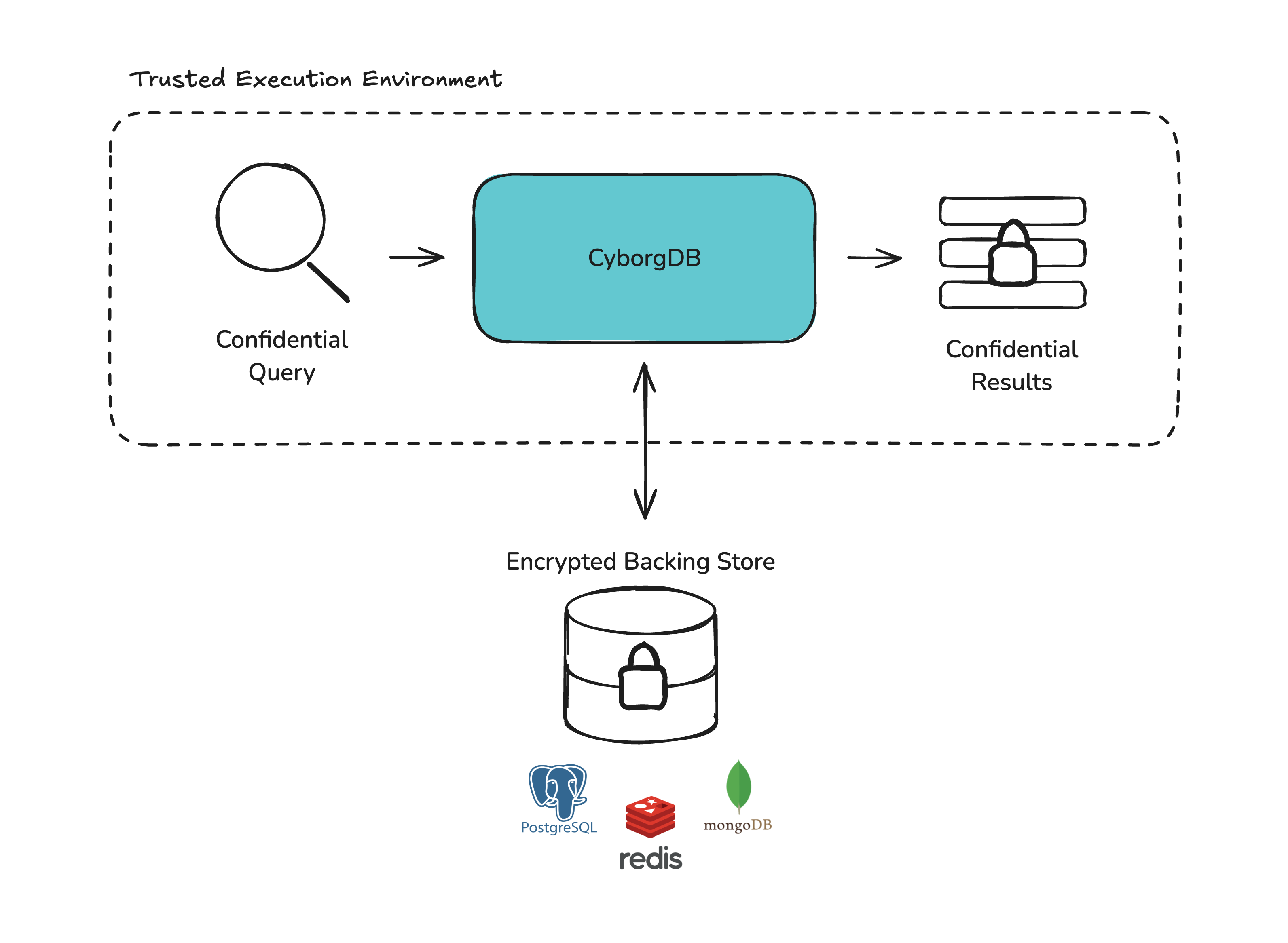 **Storage surface.** CyborgDB supports `memory`, `disk`, and `s3` (AWS S3 or any S3-compatible store) across both deployment models.
## Amazon S3
*Available in: Service · Embedded*
**Scalable cloud object storage for distributed deployments**
CyborgDB supports Amazon S3 (and S3-compatible stores such as MinIO) as a backing store, enabling fully cloud-native deployments without managing a traditional database server.
### Key Benefits
**Infinite Scalability**\
Object storage scales seamlessly with your data — no capacity planning or provisioning required.
**Managed Infrastructure**\
No database servers to patch, tune, or back up. AWS handles availability and durability.
**S3-Compatible**\
Works with AWS S3, MinIO, Cloudflare R2, and any other S3-compatible object store.
**Best For:** Cloud-native deployments, multi-region architectures, and workloads that already rely on object storage infrastructure.
***
## Disk
*Available in: Service · Embedded*
The embedded libraries and LangChain integration select this backend with the literal value `disk`. CyborgDB Service selects it via `CYBORGDB_DB_TYPE=disk` (and it is the default).
**Persistent local storage for single-node deployments**
The disk backend provides persistent key-value storage directly on local disk, with no network dependency. This makes it the recommended backing store for single-node CyborgDB deployments where simplicity and reliability are priorities.
### Key Benefits
**No Network Dependency**
All data is stored locally on disk — no external database servers to configure or manage.
**Persistent Storage**
Data survives process restarts with automatic durability via write-ahead logging.
**Optimized for Embedded Use**
Low memory footprint with filesystem support.
**Best For:** Embedded/local deployments, single-machine applications, edge devices, and scenarios where you want persistent storage without external infrastructure.
***
## Memory
*Available in: Service · Embedded*
The embedded libraries refer to this backend as "ThreadSafeMemory". CyborgDB Service v0.17 selects it via `CYBORGDB_DB_TYPE=memory`.
**Local in-process storage for development and testing**
Memory-based storage keeps all data in local process memory, providing the fastest possible access with zero network overhead. Perfect for development, testing, and single-process applications.
### Key Benefits
**Zero Network Latency**\
Direct memory access without serialization overhead for maximum performance.
**Development Simplicity**\
No external dependencies or configuration required — instant setup for prototyping.
**Deterministic Performance**\
Predictable access patterns with complete control over memory usage.
**Best For:** Development and testing environments, single-process applications, proof-of-concept scenarios, and ephemeral data requirements.
***
## Managed Services Support
CyborgDB works seamlessly with managed object storage services, reducing operational overhead while maintaining security and performance.
**Amazon S3**\
Scalable object storage with 11 nines of durability
**Cloudflare R2**\
S3-compatible object storage with zero egress fees
**MinIO**\
S3-compatible object storage you control end-to-end
***
## Choosing the Right Backing Store
* **Single-node deployment** — You want persistent local storage with no external dependencies
* **Edge devices** — Running on hardware without network access to databases
* **Simplicity** — You want a single-binary deployment with built-in storage
* **Local development** — Persistent storage that survives restarts without infrastructure
* **Default choice** — It's the v0.17 service default and works out of the box
* **Cloud-Native** — Your infrastructure already uses AWS or S3-compatible storage
* **Serverless** — You want durable storage without managing database servers
* **Multi-Region** — You need geo-distributed data with S3 replication
* **Horizontal scaling** — Multiple service replicas need to share state
* **Cost** — Object storage is cheaper than provisioned database instances at scale
* **MinIO / R2** — You want S3-compatible storage on-premise or in a private cloud
* **Development** — You're building and testing your application
* **Single Process** — Your application runs in a single process or container
* **Temporary Data** — Your vectors are computed on-demand and don't need persistence
* **Simplicity** — You want to minimize external dependencies
* **Maximum Performance** — Need absolute fastest access with zero network overhead
## Configuration Examples
### Embedded library
```python Disk theme={null}
from cyborgdb_core import DBConfig
# Local disk (default path: ~/.cyborgdb/data)
db_config = DBConfig("disk")
```
```python S3 theme={null}
from cyborgdb_core import DBConfig
# AWS S3
db_config = DBConfig("s3://my-bucket?region=us-east-1")
# AWS S3 with explicit credentials
db_config = DBConfig("s3://my-bucket?region=us-east-1&access_key=AKID...&secret_key=...")
# MinIO (S3-compatible)
db_config = DBConfig("s3://my-bucket?region=us-east-1&endpoint=http://localhost:9000&access_key=minioadmin&secret_key=minioadmin")
```
```python ThreadSafeMemory theme={null}
from cyborgdb_core import DBConfig
# Thread-safe in-memory storage
db_config = DBConfig("threadsafememory")
```
### Service
Select via the `CYBORGDB_DB_TYPE` environment variable (or the equivalent YAML key). See [Environment Variables](../service/guides/advanced/env-vars) for the full list.
```bash theme={null}
# disk (default)
export CYBORGDB_DB_TYPE=disk
export CYBORGDB_DISK_PATH=/var/lib/cyborgdb # optional
# s3
export CYBORGDB_DB_TYPE=s3
export CYBORGDB_S3_BUCKET=my-bucket
export CYBORGDB_S3_REGION=us-east-1
# memory
export CYBORGDB_DB_TYPE=memory
```
## Performance Characteristics
| Backing Store | Latency | Throughput | Durability | Consistency |
| --------------------------------- | :-----: | :--------: | :-------------: | :--------------------------: |
| **Memory** / **ThreadSafeMemory** | \~1µs | Very High | None | Single Process / Thread-Safe |
| **Disk** | \~10µs | High | Local Disk | Single Process |
| **S3** | \~10ms | Medium | Full (11 nines) | Eventual |
Choose based on your application's specific requirements for speed, durability, and consistency.
**Storage surface.** CyborgDB supports `memory`, `disk`, and `s3` (AWS S3 or any S3-compatible store) across both deployment models.
## Amazon S3
*Available in: Service · Embedded*
**Scalable cloud object storage for distributed deployments**
CyborgDB supports Amazon S3 (and S3-compatible stores such as MinIO) as a backing store, enabling fully cloud-native deployments without managing a traditional database server.
### Key Benefits
**Infinite Scalability**\
Object storage scales seamlessly with your data — no capacity planning or provisioning required.
**Managed Infrastructure**\
No database servers to patch, tune, or back up. AWS handles availability and durability.
**S3-Compatible**\
Works with AWS S3, MinIO, Cloudflare R2, and any other S3-compatible object store.
**Best For:** Cloud-native deployments, multi-region architectures, and workloads that already rely on object storage infrastructure.
***
## Disk
*Available in: Service · Embedded*
The embedded libraries and LangChain integration select this backend with the literal value `disk`. CyborgDB Service selects it via `CYBORGDB_DB_TYPE=disk` (and it is the default).
**Persistent local storage for single-node deployments**
The disk backend provides persistent key-value storage directly on local disk, with no network dependency. This makes it the recommended backing store for single-node CyborgDB deployments where simplicity and reliability are priorities.
### Key Benefits
**No Network Dependency**
All data is stored locally on disk — no external database servers to configure or manage.
**Persistent Storage**
Data survives process restarts with automatic durability via write-ahead logging.
**Optimized for Embedded Use**
Low memory footprint with filesystem support.
**Best For:** Embedded/local deployments, single-machine applications, edge devices, and scenarios where you want persistent storage without external infrastructure.
***
## Memory
*Available in: Service · Embedded*
The embedded libraries refer to this backend as "ThreadSafeMemory". CyborgDB Service v0.17 selects it via `CYBORGDB_DB_TYPE=memory`.
**Local in-process storage for development and testing**
Memory-based storage keeps all data in local process memory, providing the fastest possible access with zero network overhead. Perfect for development, testing, and single-process applications.
### Key Benefits
**Zero Network Latency**\
Direct memory access without serialization overhead for maximum performance.
**Development Simplicity**\
No external dependencies or configuration required — instant setup for prototyping.
**Deterministic Performance**\
Predictable access patterns with complete control over memory usage.
**Best For:** Development and testing environments, single-process applications, proof-of-concept scenarios, and ephemeral data requirements.
***
## Managed Services Support
CyborgDB works seamlessly with managed object storage services, reducing operational overhead while maintaining security and performance.
**Amazon S3**\
Scalable object storage with 11 nines of durability
**Cloudflare R2**\
S3-compatible object storage with zero egress fees
**MinIO**\
S3-compatible object storage you control end-to-end
***
## Choosing the Right Backing Store
* **Single-node deployment** — You want persistent local storage with no external dependencies
* **Edge devices** — Running on hardware without network access to databases
* **Simplicity** — You want a single-binary deployment with built-in storage
* **Local development** — Persistent storage that survives restarts without infrastructure
* **Default choice** — It's the v0.17 service default and works out of the box
* **Cloud-Native** — Your infrastructure already uses AWS or S3-compatible storage
* **Serverless** — You want durable storage without managing database servers
* **Multi-Region** — You need geo-distributed data with S3 replication
* **Horizontal scaling** — Multiple service replicas need to share state
* **Cost** — Object storage is cheaper than provisioned database instances at scale
* **MinIO / R2** — You want S3-compatible storage on-premise or in a private cloud
* **Development** — You're building and testing your application
* **Single Process** — Your application runs in a single process or container
* **Temporary Data** — Your vectors are computed on-demand and don't need persistence
* **Simplicity** — You want to minimize external dependencies
* **Maximum Performance** — Need absolute fastest access with zero network overhead
## Configuration Examples
### Embedded library
```python Disk theme={null}
from cyborgdb_core import DBConfig
# Local disk (default path: ~/.cyborgdb/data)
db_config = DBConfig("disk")
```
```python S3 theme={null}
from cyborgdb_core import DBConfig
# AWS S3
db_config = DBConfig("s3://my-bucket?region=us-east-1")
# AWS S3 with explicit credentials
db_config = DBConfig("s3://my-bucket?region=us-east-1&access_key=AKID...&secret_key=...")
# MinIO (S3-compatible)
db_config = DBConfig("s3://my-bucket?region=us-east-1&endpoint=http://localhost:9000&access_key=minioadmin&secret_key=minioadmin")
```
```python ThreadSafeMemory theme={null}
from cyborgdb_core import DBConfig
# Thread-safe in-memory storage
db_config = DBConfig("threadsafememory")
```
### Service
Select via the `CYBORGDB_DB_TYPE` environment variable (or the equivalent YAML key). See [Environment Variables](../service/guides/advanced/env-vars) for the full list.
```bash theme={null}
# disk (default)
export CYBORGDB_DB_TYPE=disk
export CYBORGDB_DISK_PATH=/var/lib/cyborgdb # optional
# s3
export CYBORGDB_DB_TYPE=s3
export CYBORGDB_S3_BUCKET=my-bucket
export CYBORGDB_S3_REGION=us-east-1
# memory
export CYBORGDB_DB_TYPE=memory
```
## Performance Characteristics
| Backing Store | Latency | Throughput | Durability | Consistency |
| --------------------------------- | :-----: | :--------: | :-------------: | :--------------------------: |
| **Memory** / **ThreadSafeMemory** | \~1µs | Very High | None | Single Process / Thread-Safe |
| **Disk** | \~10µs | High | Local Disk | Single Process |
| **S3** | \~10ms | Medium | Full (11 nines) | Eventual |
Choose based on your application's specific requirements for speed, durability, and consistency.